

Run your league without the chasing.
Schedules drafted from who’s available, reminders that send themselves, and one place to see how your league is doing.
Your week, back.
Running a league means chasing: availability, pairings, the email list, the scores. The app does the chasing.
- Who’s free this week? Fourteen texts.
- Who hasn’t played whom? The colour-coded spreadsheet.
- Did I forget Priya on the schedule email?
- What was the score? The morning after, again.
Several hours a week of chasing and manual tracking become a few minutes. The week runs itself.
Minutes a week. Not hours.
See a week get scheduled
The organizer’s flow, drawn step by step: from an empty week to every player notified.
- Open the week and click Generate matchups
- Considering player availability, time preferences, fair playtime and new opponents where possible
- Every draft explains itself: Why this schedule?
- You review and can make final adjustments, e.g. switch players or whole matches
- Transfer and publish — players see their week and get a push notification
From your spreadsheet to week one.
We set the league up with you. After that, the weekly work happens in the app.
Step 1: We set it up with you.
Send us your roster and tell us how your league runs — courts, nights, format, rules. We build it and switch on the options your league uses, then walk you through the app in an onboarding session. Your players get a welcome email, and your first calendar month is free of player fees.
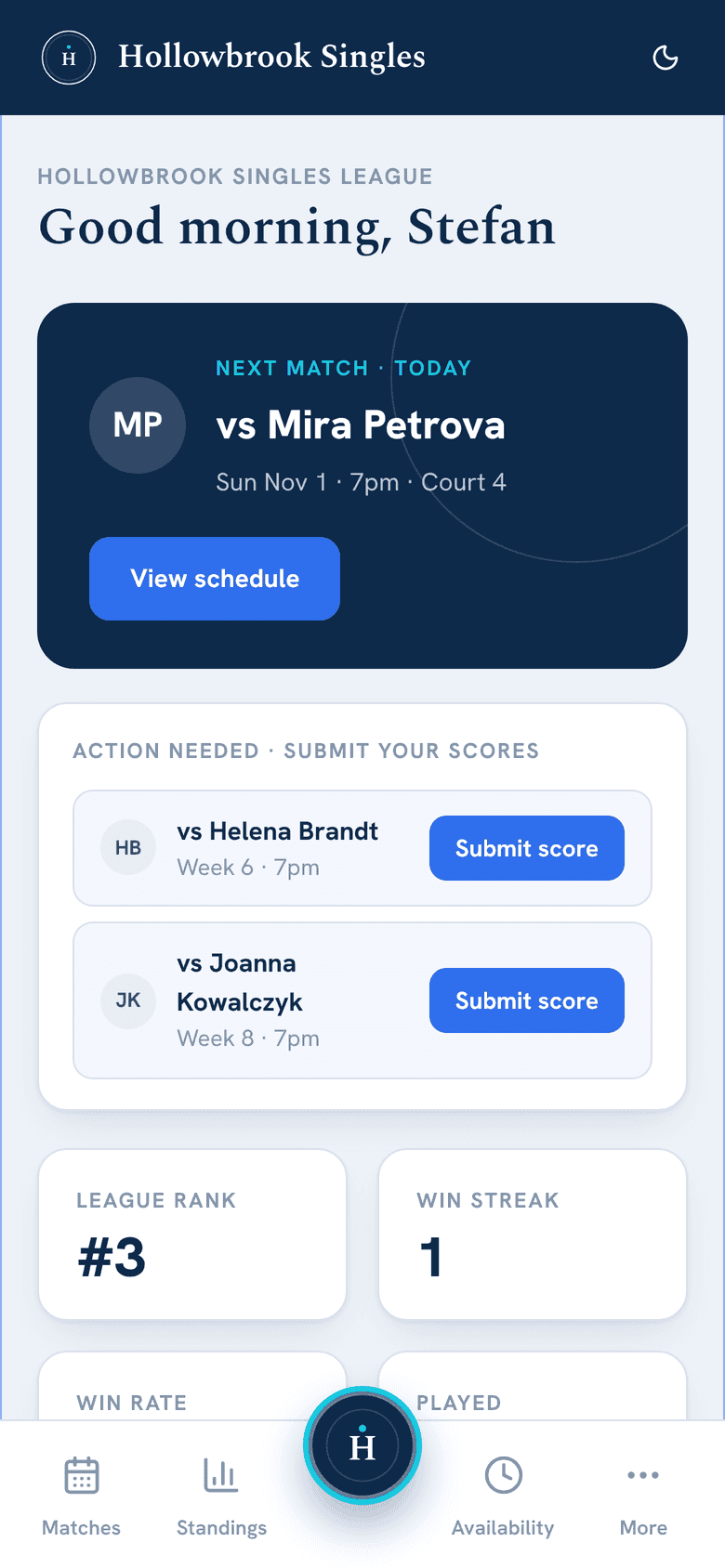
Step 2: Players get their week in their pocket.
Each player gets their opponent, time and court by email and push, with buttons to add the match to their calendar. They mark their availability from their phone, before the cutoff you set.
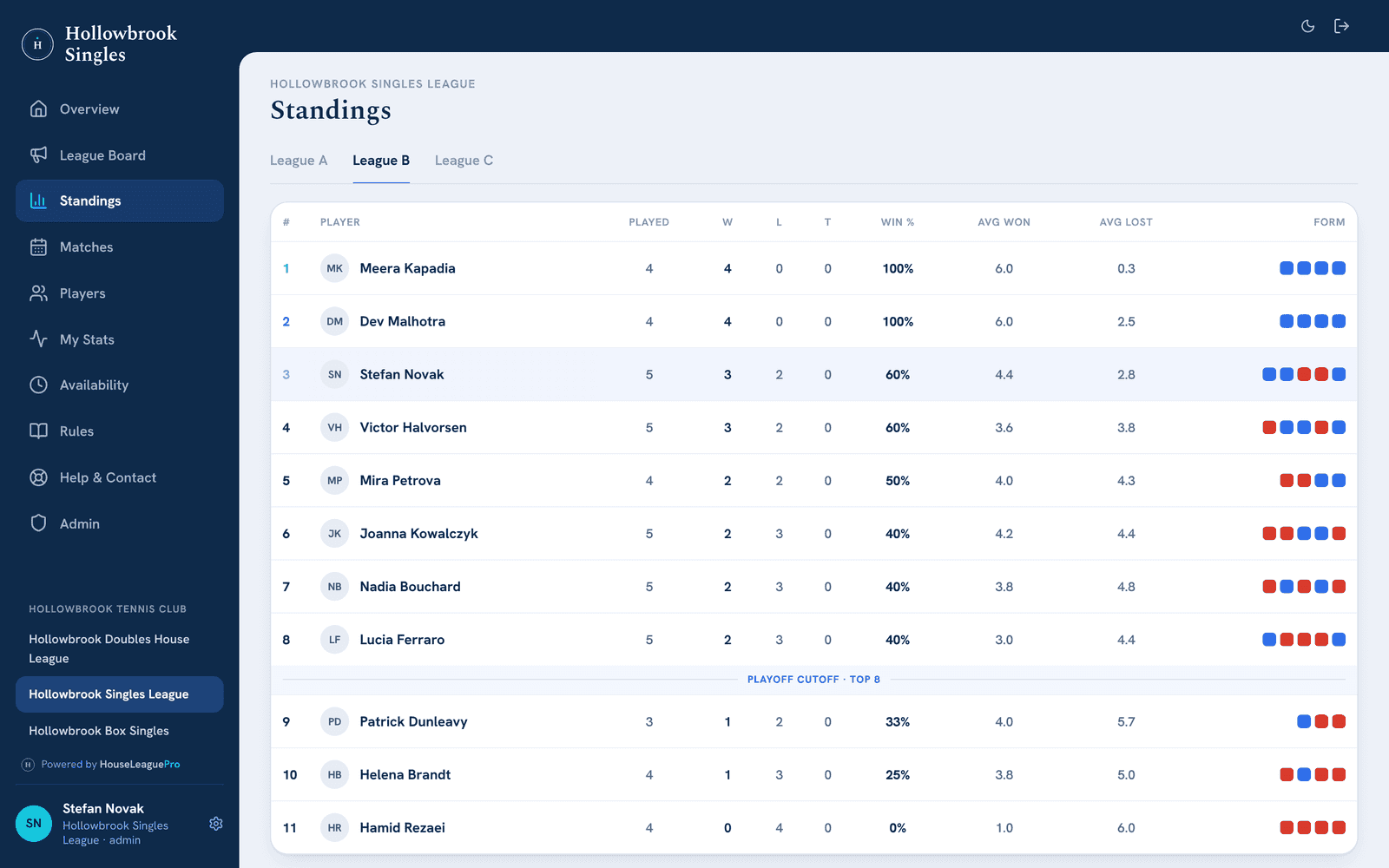
Step 3: The league runs itself.
Players enter scores from their phones. Standings and stats update on their own, and reminders go out on the schedule you choose. You step in only when something needs a human — a rainout, a sub, a score dispute.
The weekly work, done for you.
Six things the app takes off your plate. Each one runs in a real league today.
Fair schedules, explained
Each week’s draft balances court time, keeps repeat opponents to a minimum and respects preferred times, with a “Why this schedule?” note on every draft.
Reminders that send themselves
Availability reminders, score reminders and match-day emails go out daily, weekly or on a smart schedule. You choose, and see when the next one goes out.
Rainouts and no-shows
A rainout stays on the record and counts for nothing. No-shows are recorded, and reaching a strike limit pauses no one by itself: you decide what happens.
Subs, sorted
Replace a player from a list showing who’s available that week. Rotating and team doubles keep a sub list, and a seated sub with an email address gets the week’s email.
One place for league talk
Post news to the league board or email the whole league. Player messages and score-fix requests land in one Messages inbox for you to answer.
Insights on your league
Completion rates, close matches and who’s getting court time, week by week, and an Admin home that shows what needs your attention.
See how your league is doing.
Two screens you’ll use every week, and for a box league, a report that comes to you.
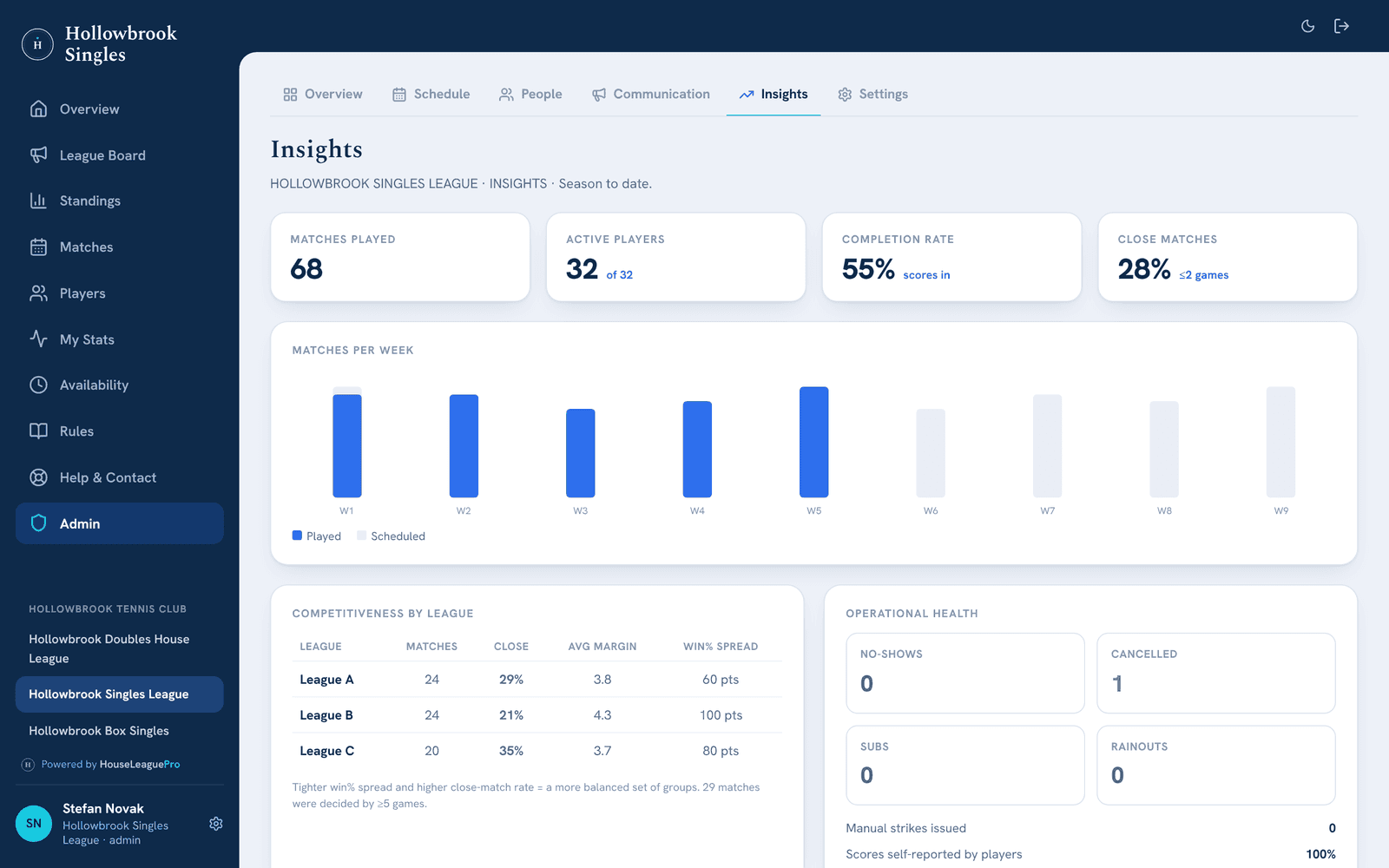
Insights
Matches played, active players, the completion rate and close matches up top, then matches per week, how competitive each group is, and no-shows, cancellations, subs and rainouts.
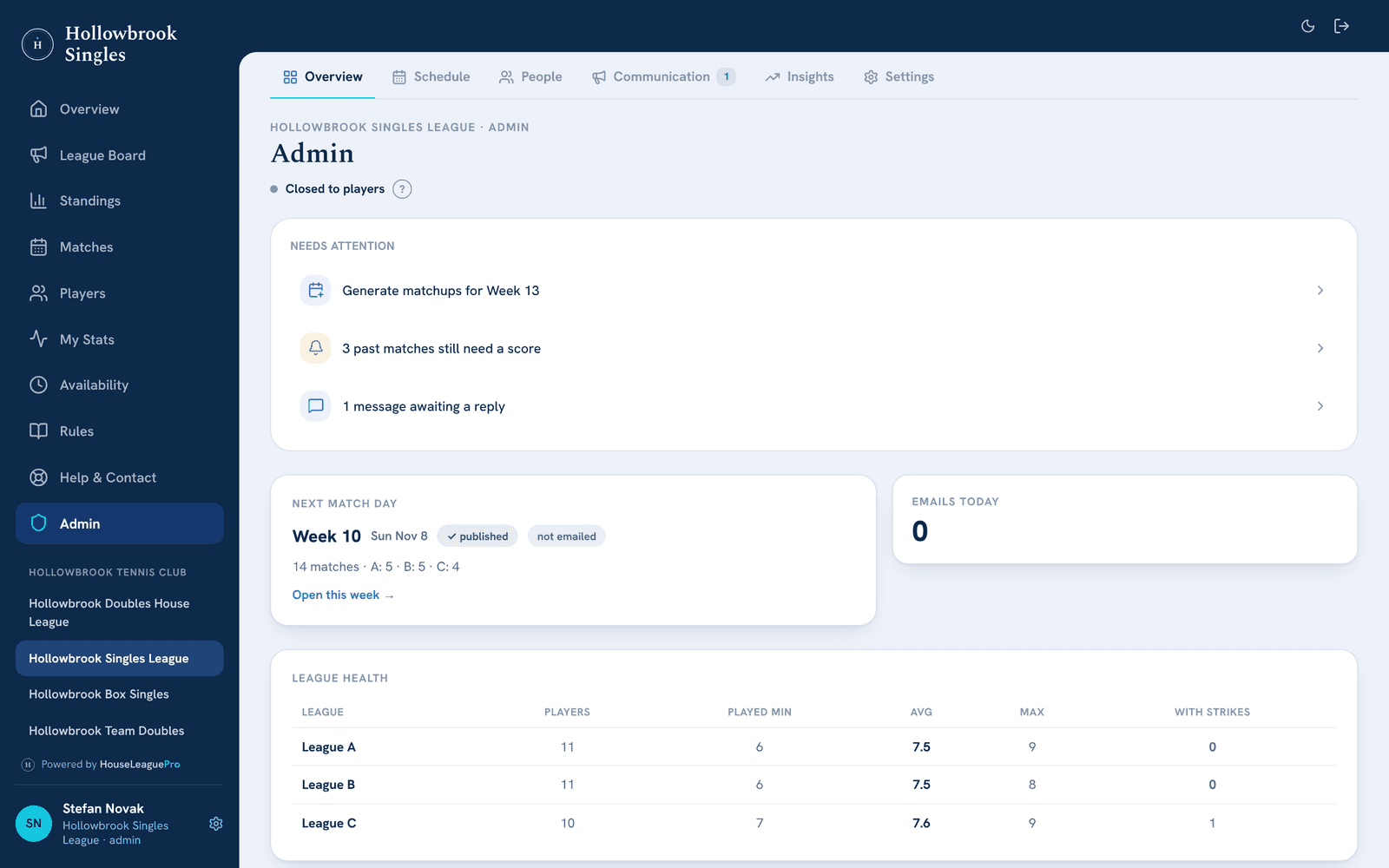
Admin home
What needs your attention, the next match day and whether it is published and emailed, today’s emails, and each group’s health: players, matches played and strikes.
Once a week, the report comes to you.
A box league sends you a weekly report: the week’s numbers, the session’s progress, the results by box with the upsets and close ones marked, and who needs a nudge. It arrives each week on the day you choose.
A drawn example with made-up names and figures. The real report is built from your own league’s week.
How box leagues run →Hi Sam,
Here's what happened in your league over the last 7 days — the numbers and the results.
What you keep deciding.
The app does the routine work. These calls stay with you.
Rainouts
If the rainout feature is enabled, send a rainout notice for the week or just the washed-out time slots. Players arrange a make-up time or skip, and a skipped match counts for nothing.
Subs
In weekly matchups, who can’t play isn’t drawn, and when someone drops out you pick the replacement from who’s free that week. In doubles, you seat a sub from your sub list.
Who moves up
At the end of a box league session the app drafts who moves up or down a box. You check it, change what you want, and apply it.
Less spreadsheet. More tennis.
Before HouseLeaguePro, I managed everything through spreadsheets: colour-coding players, tracking how many matches everyone had played, and making sure players weren’t repeatedly matched against the same opponents. The app automated so much of this process, saving me countless hours and allowing me to focus more on creating a positive experience for our players. I would absolutely recommend that other league coordinators explore HouseLeaguePro.
Last year, we had the scoresheet posted at the club. Players emailed me after every match, I updated my records at home, and then the board at the club when I was there next. I had to make a contact list every month so players could reach their box-mates. It was a headache. This year, HouseLeaguePro has simplified everything. Results update instantly, players contact their box-mates through the app, and the message board lets me get info to the whole league very easily. I was worried the very top players wouldn’t adopt it, but I was wrong: everyone has embraced it. I can’t imagine running a league of this scale any other way now.
Questions organizers ask
What do you need from us to get started?
Your roster, with each player's name and email address, and how your league runs: format, divisions, nights and time slots, courts and rules. We set the league up from that, walk you through it, and support you through your first scheduled week.
Can I see who hasn't answered for next week?
Yes. The availability grid shows every player's answer for each week: available, can't play or not answered. You can fill one in for a player who tells you in person, and availability reminders go out on their own, on the schedule you set.
What happens when it rains?
If the rainout feature is enabled, send a rainout notice for the week or just the washed-out time slots. Players then choose in the app: arrange their own make-up time, or skip. A skipped match stays on the schedule marked rained out and counts for nothing — no win, no loss, no strike — and the scheduler knows they didn’t play.
What about subs?
Need someone occasionally to make a match possible who isn’t on the active roster? No problem: seat a sub and, if they have an email address, they get the courts or schedule email when you send it. Subs need no account and never count as players on your bill.
Can we switch in the middle of a season?
Yes. A league has moved to HouseLeaguePro in the middle of a running season before, with its results so far carried over. Tell us where your season stands and we’ll plan the switch with you. Your first calendar month is free of player fees, which suits a mid-month start.
Looking at this from another side?For players →For clubs →
Let's talk about your league.
Book a free intro call and live demo — we'll learn how your league runs and show you exactly how HouseLeaguePro fits. No pressure, no obligation.