When do I play? Who against? Is it still court 3 at 7:30? Finding out by text, spreadsheet and clipboard works — until it doesn’t.
When do I play this week?
Texting the organizer… again
Did they even get it?
Who am I playing against?
The clipboard: available next week, yes or no?
With HouseLeaguePro the answer is already in your pocket.
Always in the know.
AvailabilityNext week — can you play?AvailableCan’t playAvailabilityMarked available.AvailableCan’t play
Your resultSubmitted6-3vs Priya Nair · Week 9Standings1234Marc RiveraSofia MarinStefan NovakJames Tan
HouseLeaguePronowWeek 9 — your matchYou play Priya NairSun 7:30 PM · Court 3
OrganizerSun 8:14 PMHey — when do I play this week?DeliveredMon 7:02 AMWho am I playing against?Is it still court 3?MessageEvery. Single. Week.Every.Single.Week.Every.Single.Week.Every.Single.Week.Every.Single.Week.
Always in the know.
9:41
1When do I play this week?2Texting the organizer… again.3Who am I playing? Which court?4The clipboard: in or out next week?5Every. Single. Week.6Your match, in your pocket.7Available or not: two taps.8Scores from the court.9Your rank, live.
Without HouseLeagueProWith HouseLeaguePro
For players
Everything about your week, on your phone.
Six things every player gets.
Your week, delivered
Your opponent, time and court arrive by email and push, with buttons to add the match to your Google, Apple or Outlook calendar.
Availability in two taps
Mark each coming week Available or Can’t play and save, from your phone, any time before your league’s cutoff.
Scores from the court
You or your opponent enter the result on your phone after the match. The standings follow by themselves, and a wrong score goes to the organizer as a fix request.
Standings and your stats
Live standings with your own row highlighted, plus your rank history, current streak, recent form and your head-to-head record against each opponent.
Talk to your opponent
Every match has its own message thread to agree a time. Each message is emailed too, so nobody misses one.
On any phone, no app store
Add it to your home screen and it opens like an app. Push notifications then work on iPhone and Android, and there is a dark mode.
Inside the app
What you see on your phone.
Real screens from the live app, running a demo league with made-up players.
9:41
9:41
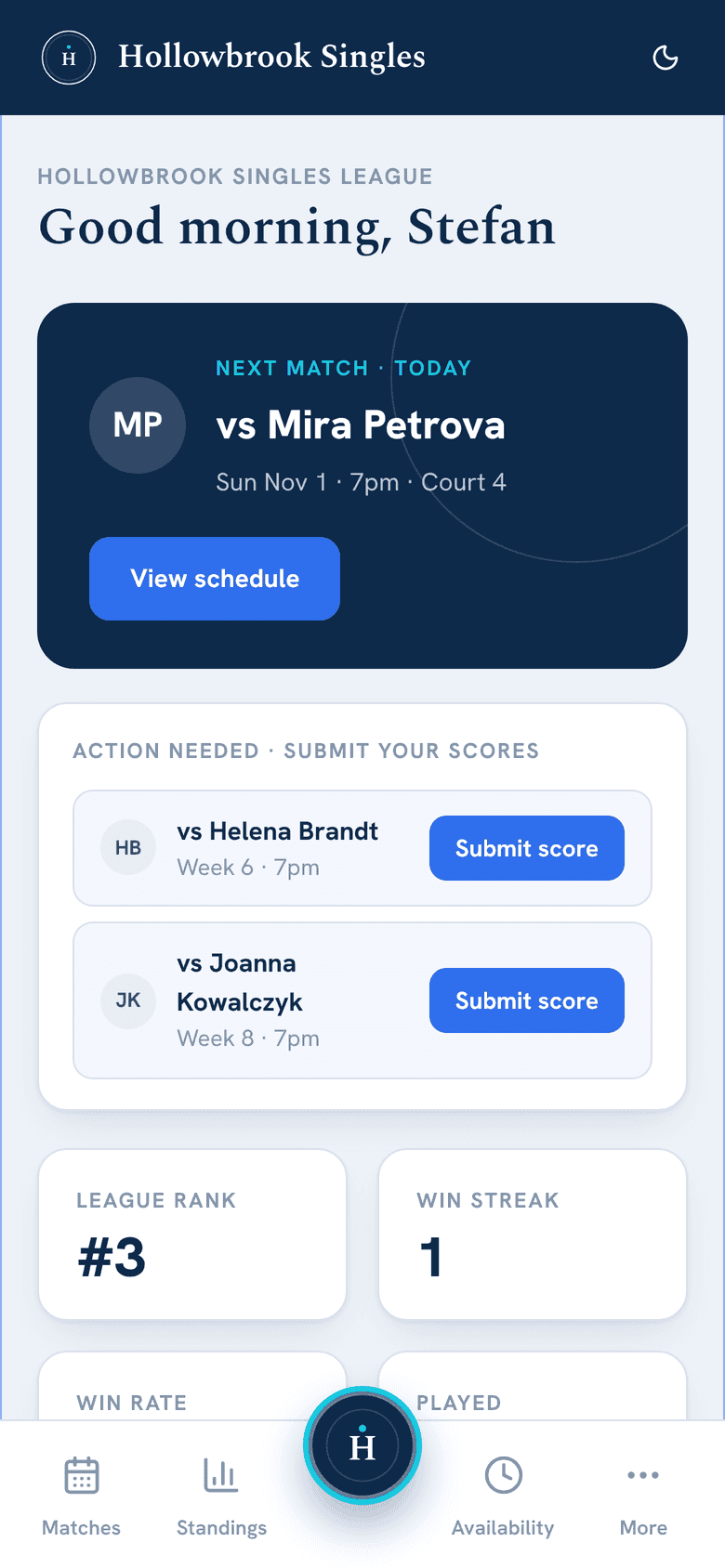
Home: your next match
Your next opponent, time and court, the scores you still have to submit and your rank. Light or dark, as you like it.
9:41
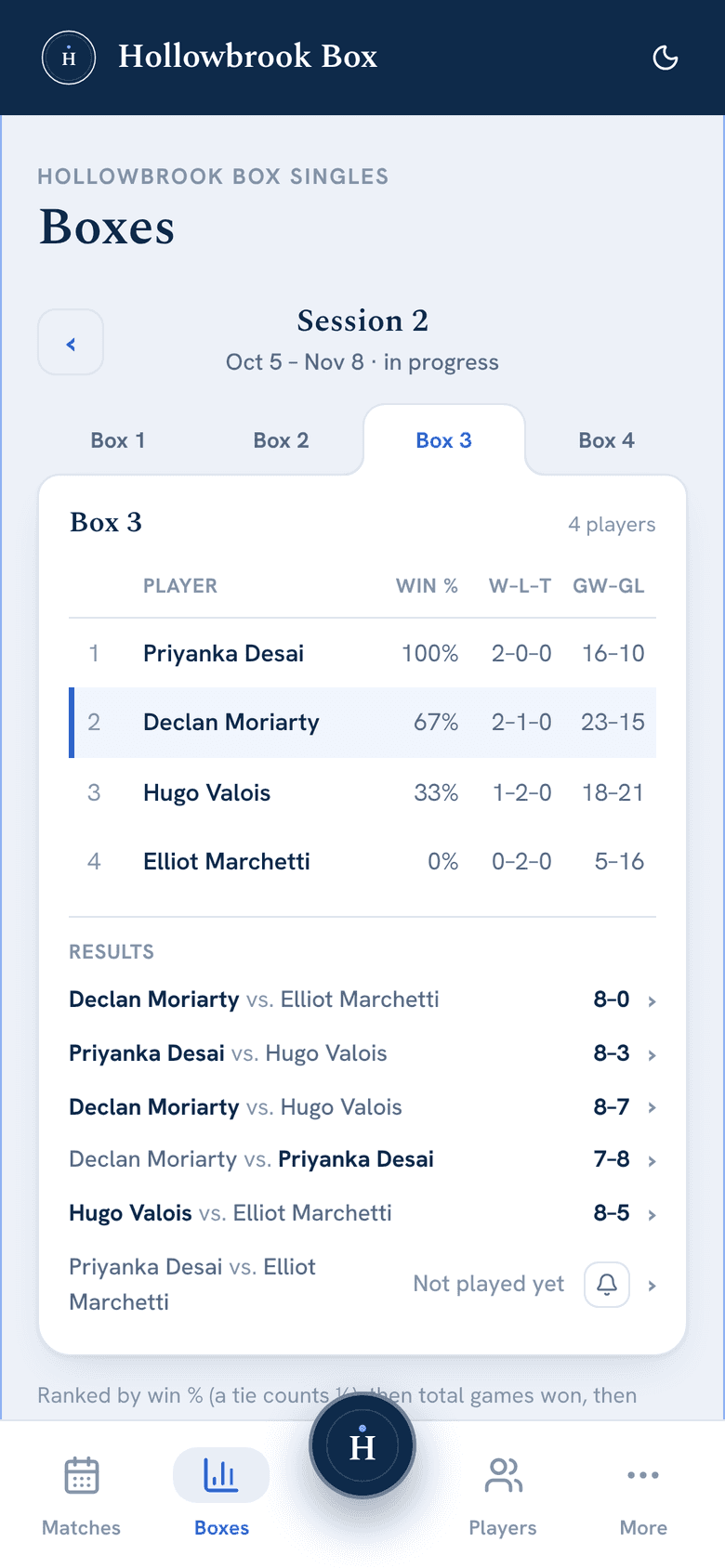
Standings
Your group’s table — played, won, lost and win percentage — with your own row highlighted and every result so far.
9:41
My stats
Your record, rank, current streak, average margin and recent form, with your ranking history as a chart.
9:41
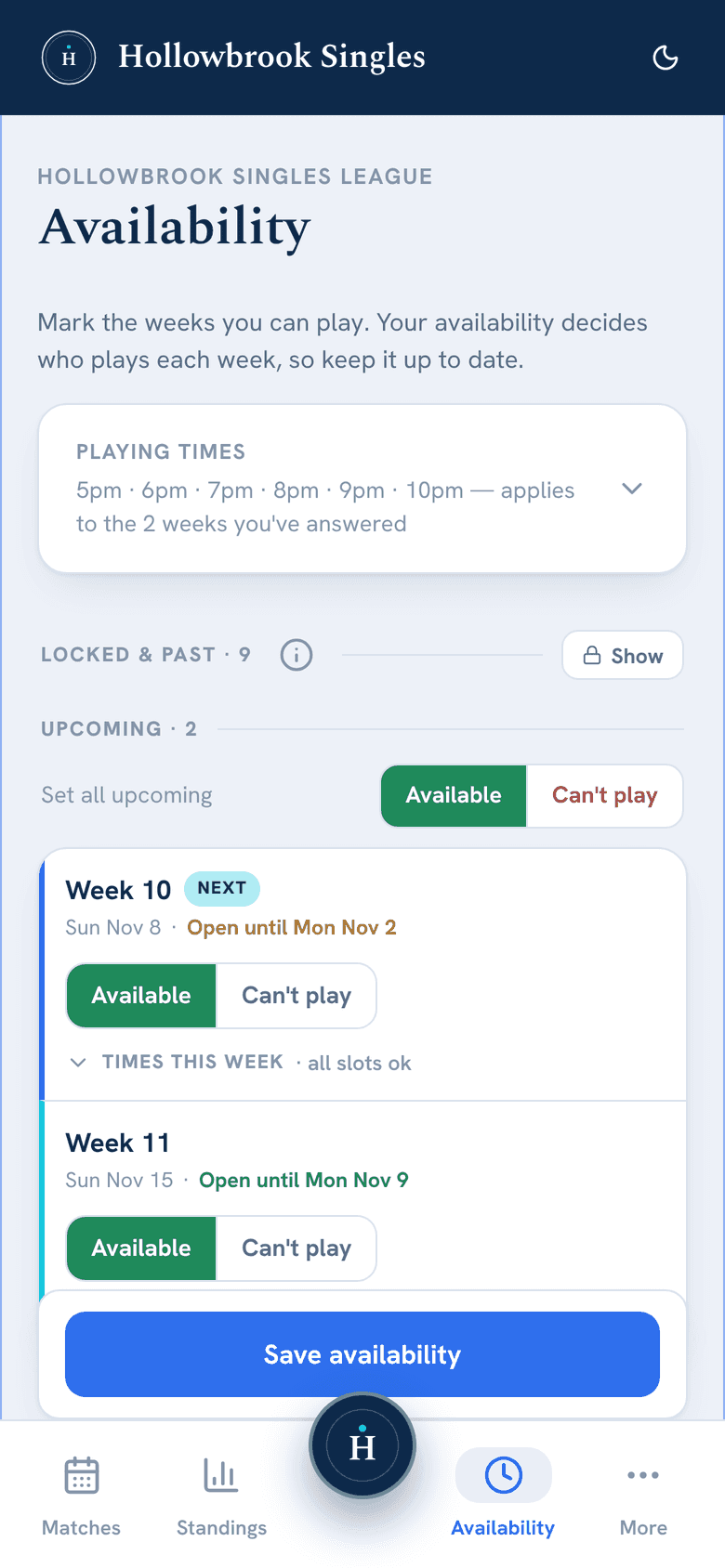
Availability
Each coming week with Available and Can’t play, the deadline beside it, and one Save button.
Any phone
Any phone, no app store.
HouseLeaguePro runs in your phone’s browser. There is nothing to download and nothing to update.
1
Open it in your browser
Sign in with the email address your league has for you. No password to remember.
2
Add it to your home screen
A few taps on iPhone or Android, and it opens from its own icon, like an app.
3
Turn on push alerts
Once it is on your home screen, push works on iPhone and Android. Everything still comes by email either way.
From the players
Less email. More tennis.
League players, in their own words.
Before, I’d email my availability and wait for the organizer to tell me if I was playing and who against. We wrote our scores down and handed them in, and with so many people in the league we never saw the standings. Now I set my availability weeks in advance, enter my scores right away, and can see all the matches and the standings. I use one app for both of my leagues and switch between them easily. It’s well organized and easy to use. I think all clubs should use this app.
JMJen M.Player, Ajax Winter Tennis Club
HouseLeaguePro has made our ladder and house league matches easy at Ajax Winter Tennis! In the past, I would have to email or text my opponents to set up ladder matches and wait for an email from the organizers to see if I’m playing that week. Now everything is all in the app. I just open it to chat with opponents to set a time, get reminders about match times, enter scores and see the standings, all in one place. My favourite part is the notification with my matches for the coming week, so I can stay organized. I would recommend the app to anyone running or playing in leagues and ladders at their tennis club!
IWIan W.Player, Ajax Winter Tennis Club
Inside, the app is laid out well and not overdone with info, just what you want to know at a glance. It’s dead easy to select availability, post scores and see standings. It’s the only tennis app I’ve used, and a huge improvement from using WhatsApp.
JMJason M.Player, Ajax Winter Tennis Club
FAQ
Questions players ask
Do I need to download an app?
No, and there's no app store. HouseLeaguePro runs in your phone's browser, and you can add it to your home screen in a few taps so it opens like an app. Once it's there, you can turn on push alerts on iPhone and Android. Everything still comes by email either way.
How do I sign in?
With the email address your league has for you. We email you a sign-in link and a 6-digit code (either one works), or you can continue with Google if that address is a Google account. There are no passwords. Only people on the league's roster can sign in, and there's no public sign-up.
Who can see my email address and phone number?
Your organizer chooses, separately for email and phone: everyone in the league, only players in your division, or no one. Phone numbers start hidden from other players. Organizers always see both.
What if I can't play one week?
If your league asks for availability, mark the week Can’t play and you won’t be scheduled. Where a match still needs someone, your organizer can seat a sub in your place, who gets the courts or schedule email. Subs need no account.
Whoever runs it can book a free intro call and live demo — we'll learn how the league runs and show exactly how HouseLeaguePro fits. No pressure, no obligation.